Online Microsoft Sam TTS Generator
Free web tool that reads your text in the old Windows XP Microsoft Sam voice
Facts checked · 8 sources · Report a correction
What is Online Microsoft Sam TTS Generator?
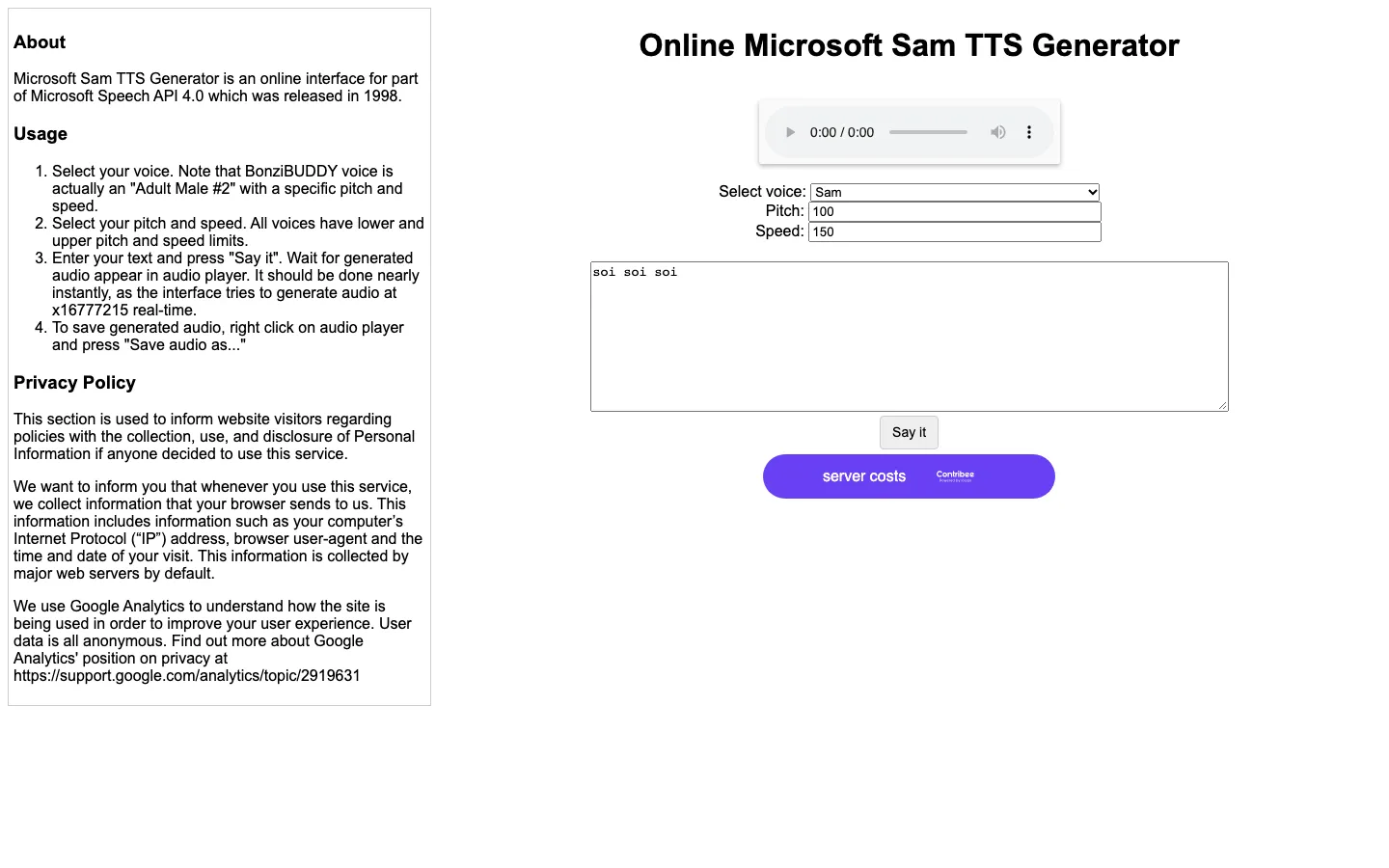
Microsoft Sam was the default text-to-speech voice in Windows 2000 and Windows XP; Windows Vista replaced it with Microsoft Anna. The Online Microsoft Sam TTS Generator at tetyys.com is the web tool people use to hear Sam today. It is a free, open-source project by the developer TETYYS, not a Microsoft product, that runs Microsoft's original 1998 Speech API 4.0 under Wine on Linux. You type text, choose Sam or another classic voice, set pitch and speed, and save the clip.
Our take
If you want the real Microsoft Sam voice for a meme, a video or nostalgia, this is the tool to use, because it runs the original 1998 software instead of an imitation. It is a free hobby service with a bare interface and no word on commercial rights, so it fits fun projects better than paid client work.
Who it is for
- Meme, YouTube and TikTok makers who want the classic Sam voice
- Retro computing fans
- Developers who want old Windows voices from a simple URL
Key features
Original SAPI4 voices
Runs Microsoft's 1998 Speech API 4.0 software, so the output is the real old voice, not an AI imitation.
Large voice list
Includes Sam, Mike and Mary, whisper variants, Lernout & Hauspie TruVoice voices, BonziBUDDY and voices in languages such as French, German, Japanese and Spanish.
Pitch and speed
Lets you change pitch and speed for each voice before generating.
Save clips
Plays the audio on the page; you keep it by right-clicking the player and choosing Save audio as.
URL API
Generates speech from a URL with text, voice, pitch and speed parameters, as documented on GitHub.
Open source
The code is public on GitHub under the MIT license.
Online Microsoft Sam TTS Generator pricing
Online Microsoft Sam TTS Generator has a free option.
| Plan | Price | What you get |
|---|---|---|
| Free | $0Browser generator with no account | Browser generator with no account |
No paid plans. The page links to donations toward server costs, and the code is open source (MIT) on GitHub.
Prices as published by the maker on Nov 21, 2026 · pricing page. Taxes and regional prices may differ.
Pros and cons
What works
- Uses Microsoft's original 1998 speech software, so Sam sounds like the real thing.
- Free, with no account or sign-up.
- Dozens of other classic voices, with pitch and speed controls.
- Open-source code and a simple URL API.
What to watch
- Bare interface; saving a clip takes a right-click on the player.
- Runs on donations, with no stated uptime or support.
- Says nothing about using the clips commercially.
- Robotic by design, so it does not suit natural narration.
How to use Online Microsoft Sam TTS Generator
- 1
Open tetyys.com/SAPI4 in your browser.
- 2
Choose Sam, or another voice, from the Select voice menu.
- 3
Set pitch and speed, or keep the defaults.
- 4
Type your text and press Say it.
- 5
Right-click the audio player and choose Save audio as to keep the file.
Is Online Microsoft Sam TTS Generator safe?
The page's privacy note says it collects information your browser sends, such as IP address and browser details, and uses Google Analytics for anonymous usage statistics. No account is needed to use it.
Online Microsoft Sam TTS Generator alternatives

Also worth a look
- SAM (Software Automatic Mouth) JavaScript version of the 1982 Commodore 64 speech program, a different robot voice often confused with Microsoft Sam.
- Balabolka Free Windows app that reads text aloud with installed SAPI voices and saves audio files.
- ttsMP3 Free online text to speech with modern voices, up to 3,000 characters a day as MP3.
More in AI Voice & Audio
Online Microsoft Sam TTS Generator FAQ
Is there an online Microsoft Sam TTS generator?
Yes. TETYYS's Online Microsoft Sam TTS Generator at tetyys.com/SAPI4 runs the original Sam voice in your browser for free.
Is Microsoft Sam TTS free?
Yes. The generator has no paid plans and no sign-up; it asks for optional donations to cover server costs.
How do I download Microsoft Sam audio?
Type your text, press Say it, then right-click the audio player and choose Save audio as.
Is Microsoft Sam still in Windows?
Sam was the default voice in Windows 2000 and Windows XP. Windows Vista and Windows 7 switched the default to Microsoft Anna.
Is the Microsoft Sam generator made by Microsoft?
No. It is an independent open-source project by TETYYS that runs Microsoft's old Speech API 4.0 software under Wine on Linux.
Is Microsoft Sam the same as SAM (Software Automatic Mouth)?
No. Software Automatic Mouth was a separate 1982 speech program for the Commodore 64, while Microsoft Sam is the Windows 2000 and XP voice.