
Applio
Free, open-source app to train and run RVC voice models on your own computer
Read this first. Applio can clone any voice from a recording, on your own computer, with no consent check. Only clone voices you have permission to use. More on safety
Facts checked · 13 sources · Report a correction
What is Applio?
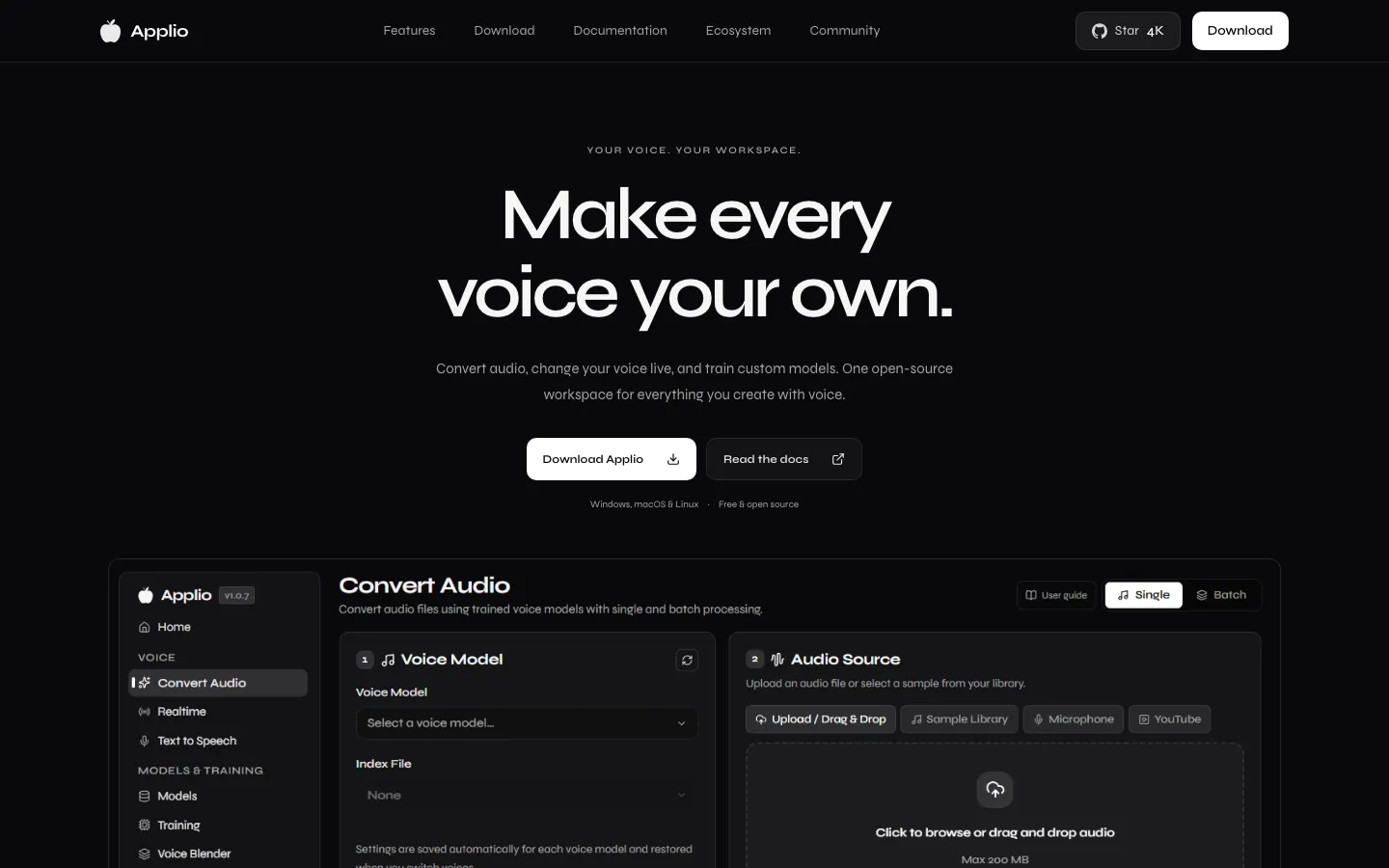
Applio is a free, MIT-licensed voice conversion suite from the IAHispano community that runs on your own computer. You load an RVC voice model, then convert audio files, change your mic voice live, or generate speech from text; you can also train new models from recordings, blend voices and separate audio. It ships as a desktop app for Windows, macOS and Linux or as a Gradio interface that opens in your browser, and needs no account. Colab and Hugging Face options cover people without a local GPU.
Our take
Applio is the most capable free option for voice conversion if you can run software yourself: it converts, trains and live-changes voices with RVC models at no cost. The catches are setup and hardware, and it hosts no voice models, so you supply your own and carry the legal responsibility.
Who it is for
- Former Weights users who want free, local AI covers with RVC models
- Hobbyists comfortable installing and running desktop software
- Streamers who want a live microphone voice changer
- Developers and researchers who want MIT-licensed code to build on
Key features
Audio file conversion
Converts recordings, including in batches, into another voice while keeping the words and performance.
Live voice changing
Routes your microphone through a voice model in real time.
Model training
Trains new voice models from your recordings, with TensorBoard to monitor progress.
Text to speech
Generates speech from typed text.
Voice blender and audio tools
Blends models into a new voice and includes audio separation and analysis tools.
Model search
Looks up community RVC models hosted elsewhere; Applio itself hosts none.
Desktop and cloud setups
Builds for Windows 10/11, macOS 12+ (Apple Silicon and Intel) and Linux, plus Colab, Hugging Face and Pinokio options.
Applio pricing
Applio has a free option.
| Plan | Price | What you get |
|---|---|---|
| Applio | $0All features under the MIT license; no accounts, paywalls or telemetry | All features under the MIT license; no accounts, paywalls or telemetry |
Free and open source. The site links to Ko-fi for optional donations, and the README asks commercial users to contact support@applio.org.
Prices as published by the maker on Nov 21, 2026 · pricing page. Taxes and regional prices may differ.
Pros and cons
What works
- Free under the MIT license, with no account, paywall or telemetry.
- Runs locally, so your recordings and models stay on your machine.
- Covers the whole workflow: file conversion, live mic, training, text to speech and voice blending.
- Still shipping releases: at least five between September and November 2026.
What to watch
- You install and run it yourself, and speed and memory needs depend on your hardware.
- It hosts no voice models, so you train your own or find them elsewhere and carry the legal risk.
- The README says it will no longer get frequent updates beyond security patches, dependency updates and occasional features.
- No consent checks: using other people's voices responsibly is entirely up to you.
How to use Applio
- 1
Download the desktop app or the Gradio version from applio.org for Windows, macOS or Linux.
- 2
Install and launch it; the Gradio version opens in your web browser.
- 3
Load a voice model you trained or have permission to use.
- 4
Convert an audio file, or route your mic through the model for live changing.
- 5
To build your own model, record clean audio of the voice and run the training workflow.
Is Applio safe?
Applio runs locally, so your recordings stay on your machine, but nothing stops anyone cloning a voice without permission. Applio runs locally, and its site says there are no accounts and no telemetry. Its Terms of Use allow personal, research and commercial use only with the right permissions, and ban audio made to defame, harm, manipulate, deceive or defraud others or that infringes copyright. Its model search states that Applio does not host, verify or control any RVC models and that users are fully responsible for what they download.
Applio alternatives
More in AI Voice & Audio
Online Microsoft Sam TTS Generator
Free web tool that reads your text in the old Windows XP Microsoft Sam voice
Free
TranscribeToText.AI
Turns audio, video and meeting recordings into text in 117+ languages
Free plan · $0.31/day (billed as a 3-month plan)

ElevenLabs
AI speech platform with text to speech, voice cloning and a speech-to-speech changer
Free plan · $6/month
Applio FAQ
Is Applio free?
Yes. Applio is free and open source under the MIT license, with no accounts or paywalls.
Is Applio safe?
It is open source, runs on your own computer, and its site says it has no telemetry. Applio does not host or check voice models, so anything you download from elsewhere is your responsibility.
Does Applio work on Mac?
Yes. The desktop app supports macOS 12 or later on Apple Silicon and Intel, plus Windows 10/11 and Linux.
Do I need a GPU for Applio?
Speed and memory needs depend on your hardware and the model. Without a local GPU, you can use the Google Colab or Hugging Face options Applio lists.
Is Applio still being updated?
The README says it will no longer get frequent updates and will focus on security patches, dependency updates and occasional features. Version 3.7.2 was released on Nov 19, 2026.
Can I use Applio commercially?
The MIT license allows it, but the terms require proper rights to the audio you use, and the team asks commercial users to contact support@applio.org.
Guides that mention Applio
What happened to Weights.gg, and where AI cover makers went
Weights shut down on March 31, 2026, and its team joined OpenAI. What happened, what is still available, and the options for making AI voice covers now.
Updated Nov 21, 2026
AI tools that shut down in 2026: Weights, Sora, Meshcapade and more
Popular AI tools that closed or went dark in 2026, with the dates, what happened to users’ work, and what to check before you rely on the next one.
Updated Nov 21, 2026
Sources
- applio.org/
- www.applio.org/download
- www.applio.org/playground
- www.applio.org/search
- docs.applio.org/
- docs.applio.org/tos/
- github.com/IAHispano/Applio
- github.com/IAHispano/Applio/releases
- raw.githubusercontent.com/IAHispano/Applio/main/README.md
- api.github.com/repos/IAHispano/Applio
- api.github.com/repos/IAHispano/Applio/releases?per_page=5
- api.github.com/repos/RVC-Project/Retrieval-based-Voice-Conversion-WebUI
- www.weights.com/replay